
Welcome to Part 3 of our ongoing Admin Resource Hub series, helping you build and run a great Flickr group. For this round, we’re talking about group engagement. We’re sharing some tips on keeping your group active and welcoming.
A group is only as lively as the people in it. You can have a catchy description, straightforward rules and keep on top of your admin’ing duties but still end up with quiet discussion threads and slow moving photo pools. Spaces that have gone quiet or appear unattended, can lead to new members not knowing where to start or regulars not finding a reason to come back. The good news is that keeping a group active doesn’t have to be an impossible task. It takes a welcoming first impression, some routine and a few reasons to show up to improve the pace and the engagement.
Help the right audience find you
A group can’t grow if the photographers who’d love it never hear about it. A few small things make your group easier to find and easier to share:
- Give your group a web address that’s easy to recognize. Admins can create a personalized Flickr URL for the group, which is much easier to drop into a profile, a photo description, or a conversation rather than the long default link it’s originally assigned.
- Choose a cover photo that represents your group. Admins can set a Safe and Public image from the pool as the cover photo. Pick one that shows at a glance what the group is about. As another option, some admins award the top cover photo spot to challenge or contest winners within the group, for a specific amount of time. This can be a fun way to incentivize participation.
- Invite people whose work fits. Flickr allows you to invite friends to a group. We suggest when using that feature to include a personal note, something like “I thought of you for this one”, a personal message goes a long way.
- Invite specific photos that match your group’s vibe. Similar to inviting individual people to your group, you can also invite photos that you come across and admire while exploring Flickr. It’s another great way to let prospective members know you appreciate their work and think it’s a good fit for your group.
- Mention the group where it’s relevant (without spamming). Your profile and your own photo descriptions are good homes for a link, as long as it’s useful to the reader.
Remember, aim for the right members rather than the most members. A smaller group where people comment on each other’s work will feel more alive than a large one where photos go unseen.
Build a routine members can count on
Groups tend to stay active when people know what to expect. A light weekly structure gives regulars a reason to check in and gives newer members an easy way to jump in. Here’s an example you can borrow from and reshape to fit your group:
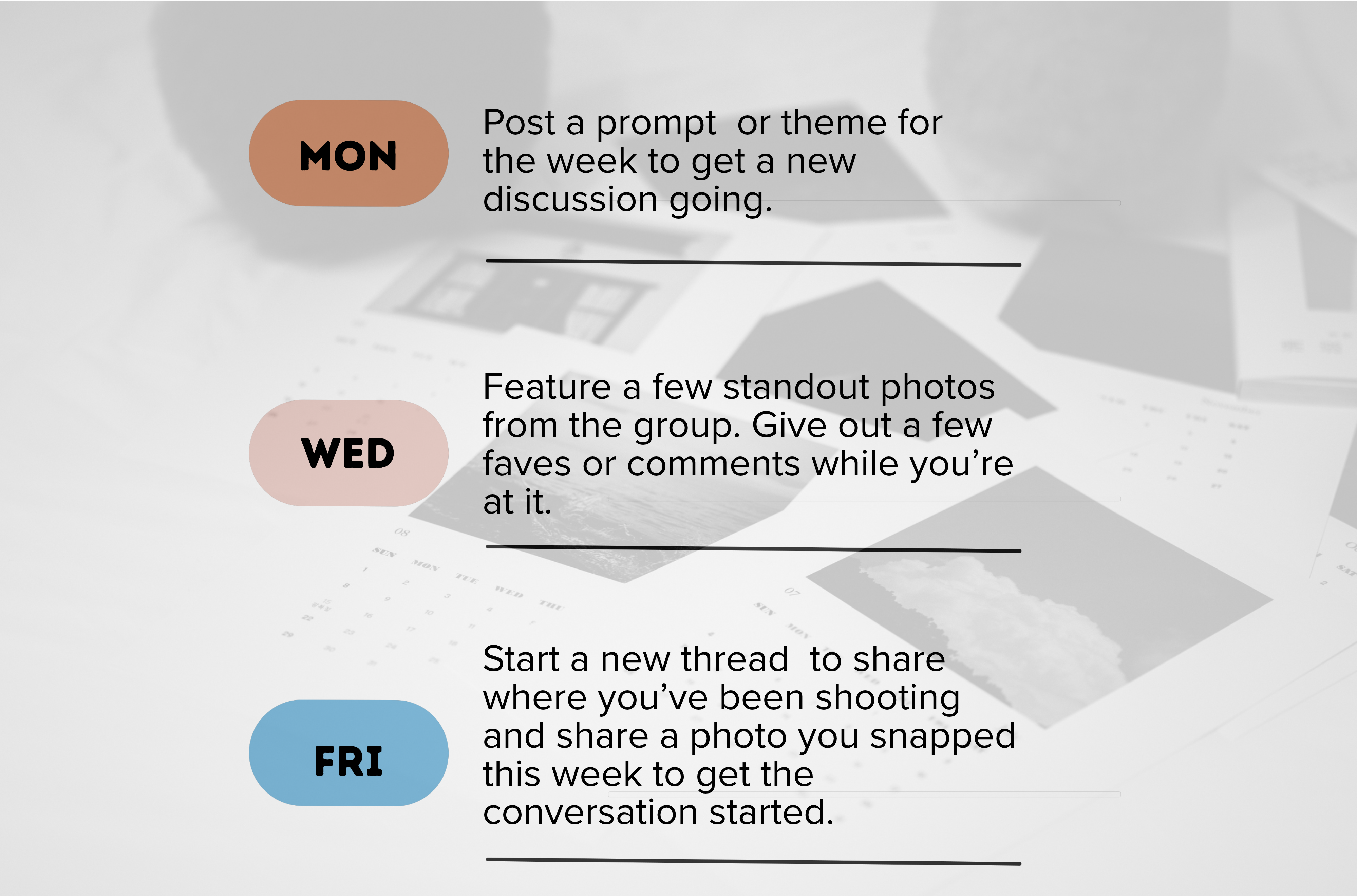
You don’t need to hit every day. Even one predictable post a week beats a burst of activity followed by silence.
Prompts that start conversations
Photo groups run on photos, but discussion is what turns a pool into a community. Prompts that invite a story, not just an upload, tend to get people talking:
Rotate between prompts that ask for a photo, a story, or a question. Variety keeps the rhythm from feeling like homework.
Consider photo challenges
If your group needs a boost of energy or a jumpstart, consider running a themed photo challenge. Photo challenges give people a reason to pick up the camera, and they’re easier to run than they look. A simple version:
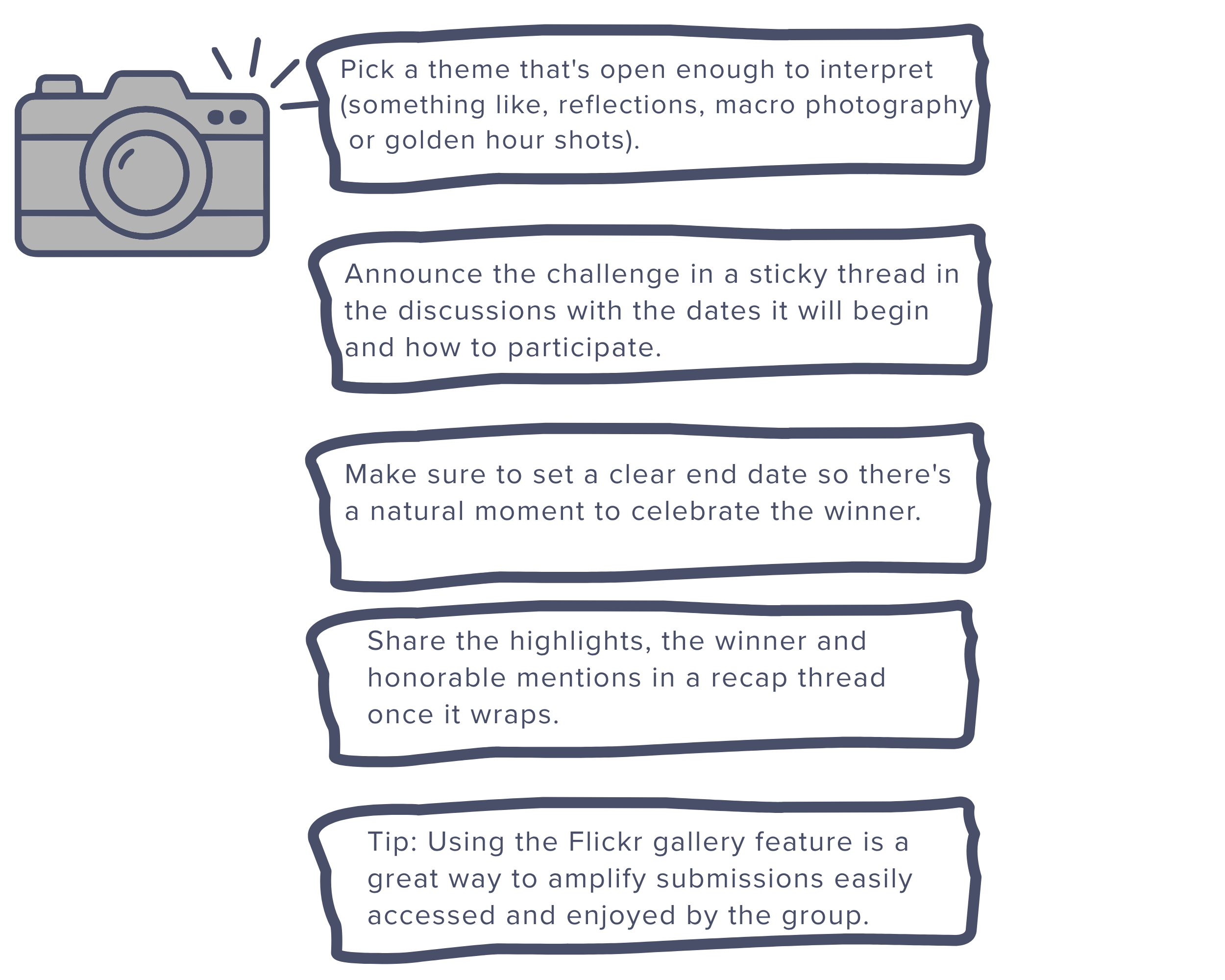
There are a lot of successful photo challenge centered groups on Flickr but if you don’t want the photo challenge to be the center focus of your group, just add one here or there, as one off challenges to get members talking. Let them know the expectations, the goals and give it a try.
For some inspiration, check out these photo challenge focused groups and get some ideas on how to set one of your own up. They are great conversation starters and many photographers love the chance to get creative.
Show people their work is being enjoyed
Featuring great photos from the photo pool motivates participation. And don’t forget to remind members that comments and faves are a way of saying thanks and keeps the community going.
A few easy ways to do that:
- Feature a member’s photo in a weekly highlight thread
- Rotate the group cover photo to spotlight different members
- Leave a genuine comment on a newer member’s first post
Giving recognition to your group members doesn’t have to be a grand gesture. Generally, just giving people some appreciation and amplification lets your group members know that you appreciate their contributions and see them as important members of the group.
Keep the photo pool balanced
If you notice one member is posting dozens of photos at a time, crowding out other members who share photos at a more paced intermittent schedule, it may be worth using some Flickr’s admin features to help you moderate that flow. Many groups handle this situation by setting a limit on how many photos each member can add. Flickr offers the option (within the group Administration tab) to specify the number of photos being submitted by: day, month, year or ever. Consider choosing a photo submission cap that fits your group’s size and pace.
If spam or other issues arise, you can also add additional boundaries like setting up a pending queue for photo submissions. This will allow you to have even more control over what shots are getting into the pool so that you have more guidance over what photos are representing your group.
Looking for more tips and a place to connect with other group admins? Make sure to check out our new Flickr Admin HQ group!
This is the third post in our Admin Resource Hub series. Missed the earlier ones? Start with Setting Up Your Group and Building Your Team. Next up: moderation and handling conflict. Have a topic you want covered? Let us know.